Schools, healthcare teams, legal offices, and product leaders often serve audiences with diverse access needs. You can enhance understanding by planning for accessibility-focused translation early.
World Braille Day is observed on January 4 to highlight Braille literacy. The United Nations promotes awareness of Braille as a vital communication tool.
Translating for Accessibility on World Braille Day 2026
Translating for accessibility means more than swapping words between languages. You also design content that people can perceive, navigate, and understand.
You can start with one truth. Many people live with disabilities, and they still need equal information access. The World Health Organization estimates 1.3 billion people experience significant disability.
Therefore, translating for accessibility protects outcomes and dignity. It also reduces confusion, rework, and avoidable risk.
Translating for Accessibility Begins with What Braille Enables
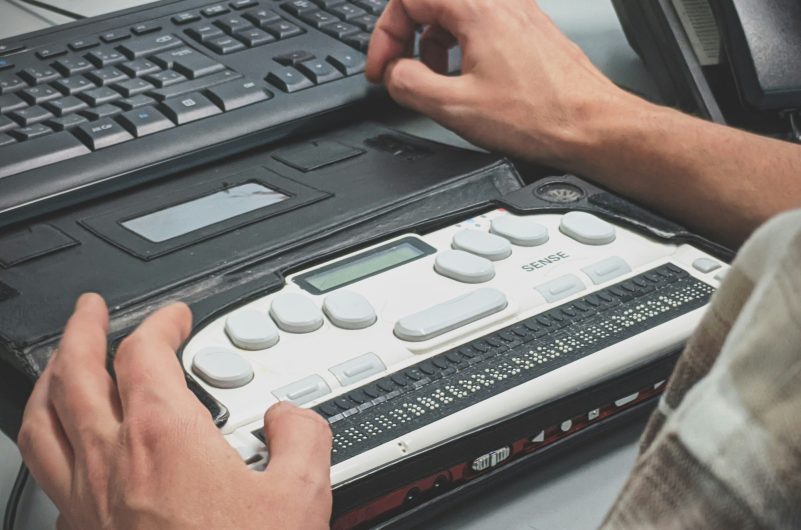
People read Braille through touch, and literacy builds independence. They use a six-dot Braille cell to form 63 character patterns. World Braille Day highlights that impact each year. People observe it on January 4 to honor Louis Braille’s legacy. However, Braille content rarely arrives alone. People also rely on screen readers, captions, and structured documents.
Translating for Accessibility Across Formats, Not Only Languages
You can treat accessibility as a format strategy and publish Braille, large print, audio, and accessible digital files.
The Marrakesh Treaty defines an “accessible format copy” for people with print disabilities.
Therefore, translating for accessibility should include alternative formats within your scope. You should also align teams on who requests, approves, and delivers each format.
Translating for Accessibility with Born-Accessible Source Files
You can save time by fixing the source first. You can write clear headings, meaningful labels, and logical reading order. Then you can translate and adapt once. Consequently, you avoid repeated remediation across languages and file types.
Translating for Accessibility in Documents That People Must Understand
Teams often share PDFs, forms, manuals, and policies. People struggle when documents break screen reader navigation. You can enhance outcomes by incorporating a clear structure into each document. You can use clear headings, consistent lists, and descriptive link text. You can also align translation with document structure. That approach supports document translation services without sacrificing accessibility. Additionally, you can plan regulated content carefully. You can request translation quality assurance for high-stakes materials, such as safety notices.
Translating for Accessibility in Websites and Digital Products
Digital experiences often fail at the edges. Error messages, forms, and navigation labels drive the most friction. You can follow established accessibility guidance to reduce that friction. The W3C publishes accessibility guidance to support users with a range of disabilities. Therefore, translating for accessibility should include functional testing, not just linguistic review. You should test keyboard navigation and screen reader flow in every locale. You can also align localization with growth goals. eTranslation Services highlights localization for websites, mobile apps, and games. To support SEO and UX, you can use website translation services and website localization services together.
Translating for Accessibility for UI Strings and Error States
You should localize microcopy with context screenshots and preserve placeholders, variables, and button intent. If you use message frameworks, you should plan early. Teams often reference the ICU MessageFormat implementation to ensure UI logic remains stable across languages.
Translating for Accessibility Through interpretation and ASL Support
Accessibility also happens in real-time conversations. People need communication support during appointments, hearings, and services. You can combine translating for accessibility with interpreting coverage. eTranslation Services lists multiple interpreting modes for different settings.
You can use Over-the-Phone Interpretation (OPI) for fast, urgent conversations. You can use Video Remote Interpretation (VRI) for visual nuance and rapport. You can also schedule In-Person Interpretation (IPI) for complex, high-stakes meetings.
You should also plan for deaf and hard-of-hearing audiences. You can include American Sign Language (ASL) interpretation in your language access plan.
Best Practices for Translating for Accessibility in 2026
You can operationalize translating for accessibility with five repeatable practices. Each practice helps you measure progress and reduce risk.
- Best practice 1: Address the source content before translation. You can enforce headings, labels, and plain-language structure. Then you reduce remediation work across every target language.
- Best practice 2: Standardize terminology and tone. You can maintain a glossary and style guide for each program. Consequently, you reduce inconsistent phrasing that confuses assistive technology users.
- Best practice 3: Test with assistive tech in every locale. You can run screen reader checks and keyboard-only checks after localization. Moreover, you can test forms and error recovery paths.
- Best practice 4: Publish alternative formats with clear request paths. You can offer Braille-ready files, large print, and accessible PDFs. You can also add audio guidance options.
- Best practice 5: Support live communication channels. You can add interpreting and ASL where audiences need immediate clarity. Then you reduce delays in care, service, and support.
Measuring Impact While Translating for Accessibility
You can build trust with metrics, even without large budgets, and track outcomes that reflect real behavior. Measure form completion rates by language. You can also measure the number of support contacts per resolved issue and the time-to-resolution for critical requests.
You can run three simple measurement exercises in 30 days and treat them as practical benchmarks, not guarantees.
First, a clinic can translate discharge instructions and appointment reminders, then track missed follow-ups and repeat calls. The clinic can aim for a 10% drop in repeat calls.
Second, a city office can localize a benefits portal and fix screen reader labels, then track application completion rates by language. The office can aim for a 15% increase in completed submissions.
Third, a SaaS team can localize onboarding flows and error messages, then track abandonment at each signup step across locales. The team can aim for a 5% reduction in drop-offs at step three.
Do you want a translating for accessibility plan that fits your channels?
Contact eTranslation Services for a scoped checklist and quote.
Translating for Accessibility with Privacy and Security in Mind
You should protect sensitive content while you improve access. You can limit file access to essential reviewers.
You can also redact identifiers before translation when permitted by policy. Then you reduce exposure while preserving meaning.
Moreover, you should align workflows with compliance needs. Teams often request multilingual translations of privacy policies to ensure clear, accessible disclosures.
A 30-Day Action Plan
You can start in January with focus and speed. Choose a small set of high-impact touchpoints.
Week 1: Audit your top documents and pages. You identify barriers for screen readers and keyboard users.
Week 2: Correct the source and create a glossary. Then you translate your top content set.
Week 3: Test every localized touchpoint. You test assistive tech and mobile layouts.
Week 4: Publish alternative formats and train staff. You also add interpreting coverage for peak hours.
If you scale global operations, you can also align marketing and support. Many teams bundle business translation services with ongoing localization workflows.
Translating for Accessibility for Specialized Industries
You should adapt translating for accessibility to regulated content and prioritize user safety and compliance. For example, life sciences teams often carefully translate labels and instructions. They may request pharmaceutical label translation and medical device IFU translation for audit readiness.
Accessibility That Carries Beyond World Braille Day
World Braille Day offers a timely reminder. However, you should treat translating for accessibility as a year-round operating system. You can build better trust with inclusive formats and clear language. You can also reduce friction for every audience you serve.
Start translating for accessibility today with eTranslation Services and
request a quote for your 2026 accessibility rollout.
Happy World Braille Day, and thank you for building communication that includes everyone.
Frequently Asked Questions (FAQs)
Who should prioritize translating for accessibility first?
Healthcare, government, education, and customer support teams should start first. These teams handle high-stakes information daily.
What does translating for accessibility include beyond translation?
It includes structure, readable layouts, and assistive tech testing. It also includes alternative formats, such as accessible PDFs.
How can schools quickly apply translation for accessibility?
They can start with enrolment forms and parental communications. Then they can localize learning portals and key policies.
How can clinics use translation services to enhance accessibility and ensure safer care?
They can first translate discharge instructions and medication directions. They can also add interpreting for complex visits.
Which interpreting option best suits urgent conversations?
Over-the-phone interpreting is well-suited to urgent, short conversations. Video remote interpreting works better when visual cues matter.
How does ASL support fit with translating for accessibility?
ASL interpretation supports Deaf and Hard of Hearing audiences. It also improves access during meetings and appointments.
What metrics can product teams track after translating for accessibility?
They can track form completion and drop-off rates by locale. They can also track support tickets per active user.
How should legal teams handle translating for accessibility with sensitive documents?
They should limit access and use secure file transfer. They should also apply consistent terminology and formatting checks.
How can nonprofits justify translating for accessibility budgets?
They can link access improvements to service completion and reduced rework. They can also track a reduction in complaint volume.
How can eTranslation Services support translating for accessibility programs?
eTranslation Services offers translation, localization, transcription, and interpreting support. The team also offers ASL and remote options.