Translating a document does not automatically make it ready to publish.
Once the original text is replaced with another language, headings may wrap onto extra lines, tables may no longer fit, fonts may fail to display certain characters, and carefully designed pages may suddenly look crowded or incomplete.
That is where multilingual desktop publishing, often called multilingual DTP, comes in.
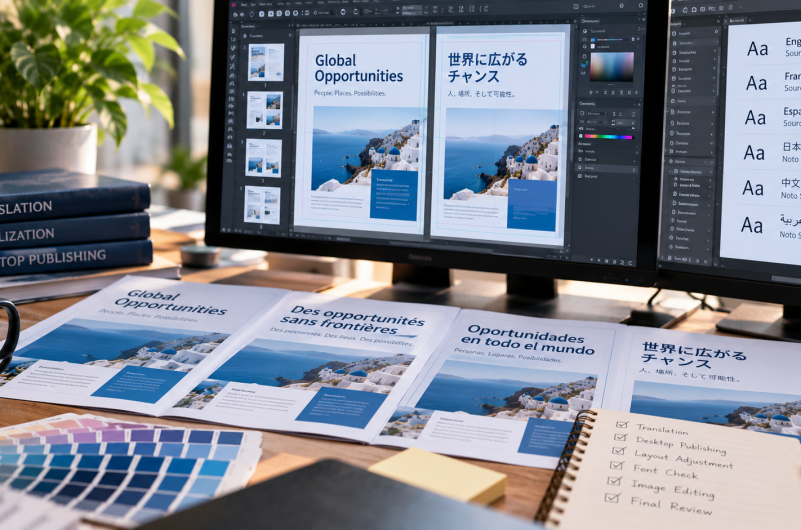
Multilingual desktop publishing adjusts the design, typography, spacing, and layout of translated content so the finished document remains clear, professional, and usable in every target language.
For brochures, manuals, reports, presentations, forms, and other designed materials, this step can be just as important as the translation itself.
What Is Multilingual Desktop Publishing?
Multilingual desktop publishing is the process of formatting translated content within its final document layout.
The goal is not simply to place translated words into the original design. The layout must also be adjusted so that the translated version remains readable, visually balanced, and appropriate for the target language.
Depending on the document, multilingual DTP may involve:
- Adjusting text boxes
- Resizing or repositioning headings
- Correcting line and page breaks
- Selecting fonts that support the target language
- Reformatting tables and charts
- Adapting right-to-left layouts
- Replacing text embedded in graphics
- Updating page numbers and cross-references
- Checking headers, footers, and captions
- Preparing final files for print or digital use
The result should look like a professionally designed document—not a translated text file placed into a layout without further review.
Translation and Desktop Publishing Are Different Steps
Translation focuses on language.
The translator works to communicate the meaning, tone, terminology, and purpose of the original content in the target language.
Desktop publishing focuses on presentation.
The DTP specialist works with the translated content inside the document’s design, making adjustments so the final version remains functional and visually consistent.
A document can have an accurate translation and still be difficult to use if:
- Text runs outside its assigned box
- Important information is cut off
- Characters appear as empty boxes
- Tables become misaligned
- Headings lose their visual hierarchy
- Page references no longer match
- A right-to-left language is displayed in the wrong direction
Translation and formatting therefore need to work together.
For projects involving official, business, or technical files, learn more about professional document translation services.
Why Does Translation Change a Document’s Layout?
Languages do not use the same number of words, characters, or lines to communicate the same idea.
A sentence that fits neatly into one line in the source language may require two or three lines after translation. Another language may express the same information using fewer characters, leaving unexpected empty space.
The layout may also change because different languages follow different writing and typographic conventions.
Text Expansion and Contraction
Translated text may be longer or shorter than the original.
This can affect:
- Buttons
- Headings
- Captions
- Tables
- Callout boxes
- Form fields
- Navigation labels
- Presentation slides
- Product packaging
- Infographics
Simply reducing the font size is not always the best solution. If the text becomes too small, readability suffers.
A DTP specialist may instead adjust the text box, spacing, line breaks, column width, or surrounding design.
Right-to-Left Languages
Languages such as Arabic and Hebrew are read from right to left.
A properly adapted layout may require more than changing the direction of the text. Page elements, navigation, icons, tables, and visual flow may also need to be repositioned so the document feels natural to the reader.
A layout designed only for left-to-right text may not work correctly without careful restructuring.
Font and Character Support
The font used in the original document may not include all the characters required by the translated language.
This can lead to:
- Missing characters
- Empty squares
- Incorrect punctuation
- Broken accents
- Uneven letter spacing
- Inconsistent visual appearance
A compatible font must support the target writing system while still fitting the document’s overall design.
The replacement should also preserve the intended hierarchy between titles, headings, body text, captions, and other elements.
Different Line-Breaking Rules
Languages do not all handle words, punctuation, and line breaks in the same way.
A line break that looks acceptable in English may divide text awkwardly in another language. Some writing systems also require different spacing or alignment practices.
These details affect readability and cannot always be fixed through automatic formatting.
Embedded Text in Images
Brochures, presentations, advertisements, manuals, and training materials often contain text inside images or graphics.
That text may not be included in the main translation file unless it is identified during project preparation.
The graphic may need to be edited or recreated so the translated wording can be inserted without damaging the design.
Tables, Forms, and Charts
Structured documents create additional challenges.
Translated labels may be too long for a table column or form field. Charts may contain legends, axis labels, notes, and data categories that also need translation and adjustment.
The finished document should remain easy to follow without forcing information into spaces that were designed for a shorter language.
What Types of Content Need Multilingual DTP?
Not every translation project requires extensive desktop publishing.
A plain text file may need little or no layout work. A designed or highly structured document usually requires more attention.
Multilingual DTP is commonly useful for:
- Brochures
- Catalogs
- Annual reports
- User manuals
- Technical documentation
- Employee handbooks
- Training materials
- Presentations
- E-learning content
- Marketing materials
- Packaging
- Product sheets
- Forms
- Policies and procedures
- Financial reports
- Legal documents
- Medical information
- Infographics
- Posters
- Certificates
- Multilingual publications
The more the document relies on layout, typography, graphics, columns, tables, or precise page structure, the more important DTP becomes.
What Does the Multilingual DTP Process Include?
The exact workflow depends on the document, software, languages, and final delivery requirements.
A typical project may include the following stages.
1. Reviewing the Source Files
Before translation begins, the team reviews the available files.
This helps identify:
- Editable source files
- Fonts
- Linked images
- Embedded text
- Tables and charts
- Formatting complexity
- Page count
- Target languages
- Output requirements
The source-file review can also reveal potential problems before they affect the schedule.
For example, a flattened PDF may be more difficult to edit than the original InDesign, Illustrator, Word, or PowerPoint file.
2. Preparing the Content for Translation
The text is extracted or prepared so translators can work with it without damaging the original layout.
During this stage, the team may identify content that should not be translated, such as:
- Product names
- Trademarked terms
- Internal codes
- URLs
- Model numbers
- Legal references
- Approved terminology
Clear instructions help prevent unnecessary changes.
3. Translating and Reviewing the Content
The text is translated and reviewed according to the project requirements.
Terminology, tone, intended audience, and subject matter all influence the translation.
For larger or recurring projects, glossaries and style guides can help maintain consistency across documents and languages.
Maintaining a consistent voice is especially important when translated materials represent the same brand across multiple markets. Read more about consistent translation and global brand voice.
4. Importing the Translation Into the Layout
The translated text is placed back into the source design or publishing file.
At this stage, the team can see how the new language affects the actual document.
Text may overflow, shift onto another page, leave excess space, or disrupt nearby elements.
5. Adjusting the Design
The DTP specialist corrects the layout while preserving the document’s purpose and visual identity.
This may include:
- Expanding or reducing text boxes
- Adjusting font sizes within readable limits
- Changing line spacing
- Repositioning images
- Resizing tables
- Revising column widths
- Correcting page breaks
- Rebuilding charts
- Mirroring right-to-left layouts
- Replacing incompatible fonts
- Updating the table of contents
- Correcting headers and footers
The goal is not to force every language version into an identical page structure at any cost. The priority is to create a clear and professional document that remains faithful to the original design.
6. Reviewing the Final Layout
The formatted document should be reviewed after the translated text is placed into its final layout.
This step may identify problems that were not visible in the translation file, including:
- Missing text
- Incorrect line breaks
- Truncated sentences
- Overlapping objects
- Untranslated labels
- Font problems
- Incorrect text direction
- Misaligned tables
- Inconsistent headings
- Wrong page references
Reviewing the content in context is important because a sentence can be linguistically correct but appear in the wrong place or be linked to the wrong visual element.
7. Preparing the Final Files
The completed document is prepared according to its intended use.
Possible deliverables may include:
- Editable source files
- Print-ready PDFs
- Web-optimized PDFs
- Presentation files
- Packaged design files
- Files prepared for additional internal review
- Separate versions for each language or market
The delivery format should be agreed upon before the project begins.
What Can Go Wrong Without Multilingual DTP?
Skipping the formatting stage can leave a translated document looking unfinished.
Common problems include:
Text That Does Not Fit
Overflowing or cut-off text can hide important instructions, warnings, product details, or legal information.
Inconsistent Fonts
A document may use several replacement fonts that do not match one another or the original brand design.
Broken Reading Direction
Right-to-left text may appear in the wrong order, while surrounding visual elements remain arranged for a left-to-right audience.
Misaligned Tables and Forms
Information may move into the wrong column, overlap borders, or become difficult to follow.
Untranslated Graphics
The main document may be translated while diagrams, screenshots, banners, or labels remain in the source language.
Incorrect Pagination
Translated content may move onto additional pages without updating the table of contents, index, internal references, or page numbers.
Reduced Readability
Trying to preserve the original layout by shrinking the text can make the document difficult to read.
These problems do not necessarily mean the translation itself is wrong. They show that the document needs another production step before it is ready for use.
Is Multilingual DTP the Same as Localization?
They are related, but they are not identical.
Localization is the broader process of adapting content for a particular market or audience.
It may involve:
- Translation
- Cultural adaptation
- Local terminology
- Dates and measurements
- Currency
- Images and symbols
- User experience
- Technical testing
- Regulatory considerations
- Search optimization
- Layout and design
Multilingual DTP focuses specifically on the visual production and formatting of the translated content.
It is often one part of a larger localization services workflow.
A localized brochure, for example, may require translated messaging, culturally appropriate images, local contact information, and multilingual desktop publishing before it is ready for distribution.
How to Prepare Files for Multilingual Desktop Publishing
Good preparation can reduce delays and avoid unnecessary rebuilding.
Send Editable Source Files
Provide the original working files whenever possible.
These may include files created in:
- Adobe InDesign
- Adobe Illustrator
- Microsoft Word
- Microsoft PowerPoint
- Adobe FrameMaker
- Other design or publishing software
A PDF is useful for reference, but the editable source is usually easier to update accurately.
Include Linked Images and Fonts
Some design files depend on external images, graphics, or fonts.
If these elements are missing, the document may not display as intended when opened by the DTP team.
Package the project files or include all required assets.
Identify Text Inside Graphics
Point out diagrams, screenshots, charts, or images containing text.
Let the team know whether those graphics should be translated, recreated, or left unchanged.
Share Brand Guidelines
Provide any relevant requirements for:
- Fonts
- Logo placement
- Colors
- Spacing
- Tone
- Capitalization
- Product names
- Trademark usage
This helps the translated versions remain consistent with your brand.
Provide a Glossary or Approved Terminology
A glossary is especially useful for recurring product names, technical terms, slogans, features, and industry language.
It can reduce revisions and improve consistency across documents.
Explain the Final Use
Tell the provider whether the document will be:
- Printed
- Published online
- Presented on screen
- Submitted to an institution
- Used internally
- Distributed in multiple markets
- Updated regularly
The intended use affects the appropriate file setup and final delivery.
Confirm the Target Languages
Some languages require more substantial layout changes than others.
Providing the full language list at the start helps the team plan fonts, reading direction, page structure, and production time.
What Should You Ask a Multilingual DTP Provider?
Before starting a project, ask questions that clarify the full scope of the service.
Useful questions include:
- Can you work with the original design software?
- Will you return editable source files?
- Can you handle right-to-left languages?
- Are fonts and character support checked?
- Is translated text inside graphics included?
- Will the final layout receive a linguistic review?
- Are print-ready and digital files both available?
- How are corrections handled?
- What source files and assets do you need?
- Is DTP included in the quote or priced separately?
The answers can help you compare services more accurately.
A low translation quote may not include formatting, image editing, font replacement, or final layout review. Confirming what is included prevents surprises later.
Does Every Translation Project Need DTP?
No.
A simple letter or plain Word document may need only basic formatting. A document with extensive design, tables, graphics, forms, or strict branding will usually require more work.
The need for DTP depends on:
- File format
- Layout complexity
- Target languages
- Number of pages
- Amount of graphical text
- Final output
- Brand requirements
- Intended audience
A translation provider can review the source files and determine the appropriate level of formatting support.
Need Translation and Multilingual Formatting?
eTranslation Services provides professional document translation and localization support for business, legal, medical, technical, marketing, and other multilingual content.
If your project includes designed or highly formatted files, send:
- The complete editable source files
- A reference PDF
- The target languages
- Your deadline
- The final delivery requirements
- Brand guidelines
- Approved terminology
- Any printing or publishing specifications
This information helps the team assess the translation, formatting, and production work before the project begins.
Request a translation quote or contact eTranslation Services to discuss your files.
Frequently Asked Questions About Multilingual Desktop Publishing
What does DTP mean in translation?
DTP stands for desktop publishing. In translation, it refers to formatting translated text inside a document’s final layout so the content remains readable, correctly arranged, and visually consistent.
What is the difference between translation and multilingual DTP?
Translation converts the meaning of the content into another language. Multilingual DTP adjusts the design, typography, spacing, and layout after the translated text is inserted into the document.
Can a PDF be translated and reformatted?
Yes, but the process is generally easier when the original editable source file is available. A PDF may need to be recreated or converted before substantial layout changes can be made.
Why does translated text not fit the original design?
Languages use different word lengths, sentence structures, characters, and writing systems. A translated sentence may occupy more or less space than the source text.
Does multilingual DTP include image translation?
It can. Text inside images, diagrams, screenshots, or infographics may need to be extracted, translated, and reinserted. Confirm whether image editing is included in the project scope.
Is multilingual DTP necessary for right-to-left languages?
Documents translated into right-to-left languages often require significant layout adjustment. Text direction, page flow, tables, icons, and other visual elements may need to be repositioned.
Is DTP included in the translation price?
It depends on the provider and the document. Some quotes include basic formatting, while complex desktop publishing may be priced separately. Ask for a clear description of what the quote covers.
Translation Is Only Part of the Finished Document
A translation may communicate the right words and still need substantial work before it is ready to publish.
Multilingual desktop publishing brings the translated content back into the document’s visual structure. It addresses text expansion, fonts, reading direction, tables, images, page breaks, and other layout details that affect how the final material is understood.
For designed documents, professional formatting is not an optional cosmetic step. It is part of making the translated content readable, functional, and ready for its intended audience.